Looking for two specific features on a cell phone

Something happened today that cemented what I’ve been feeling for a while, which is that when it’s time for a new cell phone, I’m dumping Apple for Android. Now, if I hadn’t had to figure out how to get my home internet connection to start working again, I would have let loose this afternoon. As is, the delay helped me get over being angry about it. I’m not happy it happened, but not angry any more. Miffed? Yeah.

When I go for a bike ride, I have my phone with me. Most of the time, I’ll take the work phone because it’s an Android phone and easier to get pictures off of it than with the iPhone. I’m Windows-less right now, so short of emailing them one at a time, pictures from the iPhone are stuck on the iPhone.

Today was warm enough I skipped a coat and stashed the iPhone in the storage pocket below the seat. During the ride, I get out to a more rural area and see a bald eagle fly over to a tree not that far away. Then another one lands on the road about 50 feet ahead of me. I stop and got the phone out as fast as I could. I unlock it, tap on the camera app and some kind of menu pops up.

This menu has appeared before at random times. I don’t know when it got added to the camera app. I don’t know what the criteria is for it appearing. Using the app X number of times within a certain amount of minutes? That can happen because I’ll stop to take pictures of flowers or something, start riding again and spot more I want to photograph, sometimes as little as 20 feet later.

Whatever it is, it’s some kind of shortcut menu that I can’t usually see what it says because the glare from being outdoors makes it difficult to see. Today, I couldn’t see what it was at all due to the bright sun. All I could see is there was this block of black with five options of some kind in my way in the middle of the screen.

I’m scrambling to figure out how to get rid of it. Shut down the app and start it again? I can do that even with the glare. Press the Home button twice, swipe up and tap the camera. No, menu’s still there. Try it again. Okay, now it’s gone. I can take my picture.

But now the eagle is flying away. My chance to take a picture of a bald eagle that’s wild and not in a zoo is gone. Maybe the menu is intended to help, but in this case it interfered with my ability to do what I wanted to do. The eagle was on the road for less than 10 seconds. If this had been one of the times the menu didn’t appear, I would have gotten a photo of it. Instead, by the time I finally got to where I could take the picture, it was high up in the sky again, too small to be anything other than a dot against an expanse of blue.

I was angry over this. The menu popping up for no discernible reason took something away from me I’ll never get back. Maybe I’ll get lucky and get an opportunity again to take a picture of a wild bald eagle this close to where I live. It’s a slim chance. It may never happen again. But if it does, it will be the second opportunity, not the first. The first is forever gone.
3 Likes

That sucks. There is a mated pair at the pay lake near us and they show up on the local pages quite a bit.

If anyone is buying a new cell phone and isn’t trading their old one in, would you keep me in mind for your old device? I kind of need a couple of devices that I can use for alt accounts for Pokemon Go. My two oldest devices can’t handle it anymore.

Let me know how much you want for it if you are upgrading.

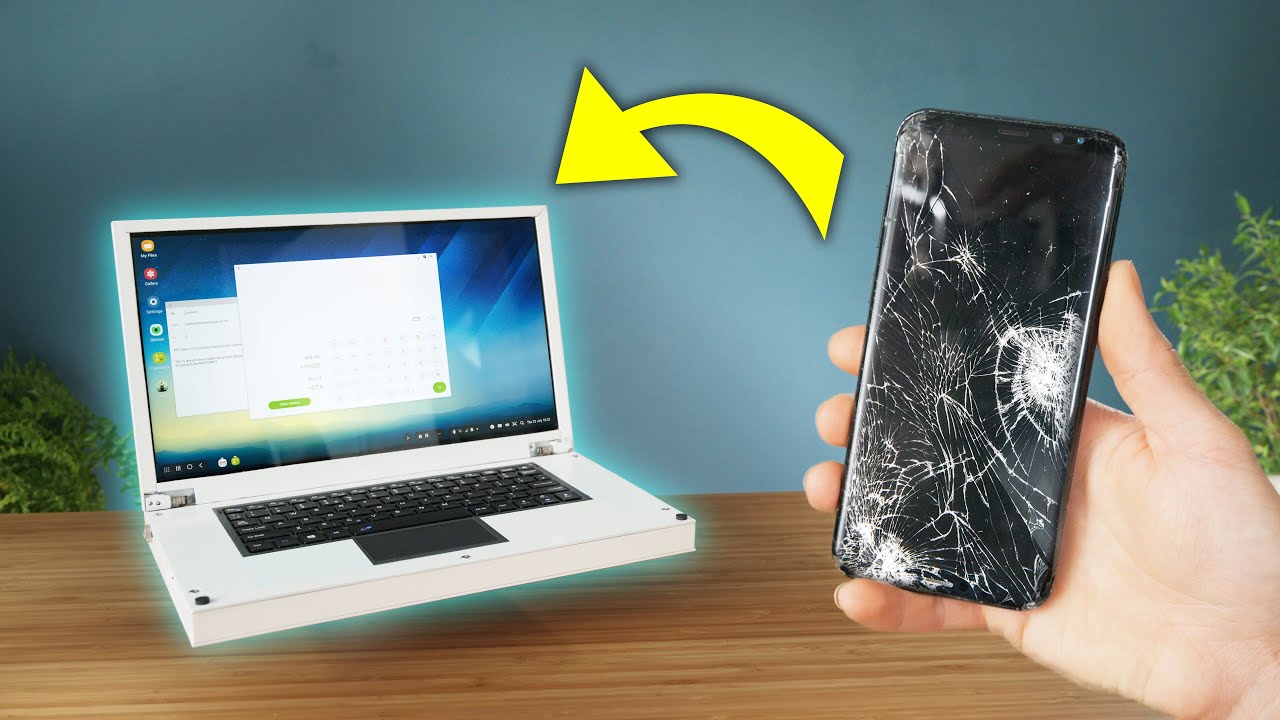
Ditto. I’m looking for a Samsung Galaxy 8 or higher. Anything that runs Dex. The screen can be busted, I’m looking for a project phone to put into a custom-built “laptop”. I have most of the bits I need. All but the phone.
Small Pelican case. BT keyboard. 13.3" screen (from China, about a month), small power bank, etc. Following is what I’m looking at doing, for the most part.

I’ve got an old HTC 10 lying around if you’re interested. The battery life is crap though.

1 Like

Ooh… That would work well for me. I carry around battery packs, so battery life isn’t a problem.

Okay, this project is going ahead much faster than expected. The 13.3" screen wasn’t supposed to get here until the end of September. It fits perfectly into the case. I have a second case I’m not using, so I may end up making another if this has any appeal at all.
I’ve never soldered a thing in my life, so I guess I’d better get a good iron and do some practicing.
The foam will be going from the bottom and a custom insert made from aluminum and/or wood with some more divided, padded compartments. The BT keyboard will be fixed below the surface, like the thumbnail above. I’ll find a way to give it a hinge so the bulk of the case can also be used for storage. The lid will house the guts of the control boards and the monitor. The battery and phone body will have to go in the main body or it’ll tip over.

I don’t know how practical this will be, but someone on the move who wants to be able to have only one computing device (phone), this could work.

2 Likes

Okay, Apple, this is getting less and less cute and more and more like deliberate obstruction. Now the phone icon is doing it, too. It’s the same thing as with the camera. Instead of just letting me make a phone call, it’s giving me options relating to contacts and one for editing the home screen. In what way is editing the home screen related to making a phone call?

I found what’s causing it. It’s the long press function that brings up the context menu for an icon. How it works changed in about iOS 13.1.2 so that the new default settings are a tap of less than about a quarter second activates the icon, but pressing on the icon slightly longer counts as a long press. How much longer? Closer to one second but could be as little as a half second.

You can sort of adjust the timing by going to Settings, Accessibility, Touch and then picking 3D & Haptic Touch. There’s a “Fast” and “Slow” Touch Duration. Fast was the default. Turning off 3D Touch doesn’t seem to actually turn it off. Anything more than that? Nope. If you press firmly on an icon like I have been doing, it will still count as a long press.

It seems Android has context menus, too. But lookie here. “Touch and hold delay” has four choices: 0.5 seconds, 1.0 second, 1.5 second and a custom setting where you can specify exactly how long you have to hold your finger down on an icon before it counts as a long press. Want ten seconds? You got it. Still not enough for people who are heavy-fingered? As I type this with my right hand and continue to press on the phone screen with my left hand, the Custom setting has just passed four minutes.

With Android, you know exactly what it will take to bring up a context menu. Apple? Maybe the Slow setting and the other one being off will be enough to keep it from getting in my way.

That is, unless the new iOS update the phone just signaled me is going to be downloaded tonight changes something else to get in my way.

3 Likes

That pretty much sums up the problems I have always had with Apple. The hardware and software are generally good, but heaven help you if you want to do anything that Apple deems unusual.
As far as Apple is concerned, it’s my way or the highway. I’ve always chosen the highway.

2 Likes

Same. Love my Android phone.

Oh, Apple, seriously? I’m listening to a voice mail without using the speakerphone. I move the phone away from my head to look at something and the voice mail stops. Really? This wasn’t a message where I needed to hear every second. It could have kept playing for the three seconds the phone wasn’t pressed against my face.